
Every donation creates a series of administrative tasks. A nonprofit must identify the donor, record the contribution, assign it to the correct fund or campaign, prepare a receipt, preserve the history and make the information available when staff need it later. None of these tasks is especially complicated on its own. The challenge comes from repeating them accurately every day.
When information is spread across spreadsheets, inboxes, paper files and separate receipt folders, even routine work can take longer than expected. Staff may record the same donor more than once, enter a contribution under the wrong profile, struggle to find an older receipt or rebuild reports manually whenever leadership needs an update.
This is where donor software for nonprofits becomes useful. It gives organizations a structured way to manage donor details, offline donation records, receipt history and reporting without relying on several disconnected systems. The purpose is not to replace personal donor relationships. It is to remove the repetitive administrative problems that make those relationships harder to manage consistently.
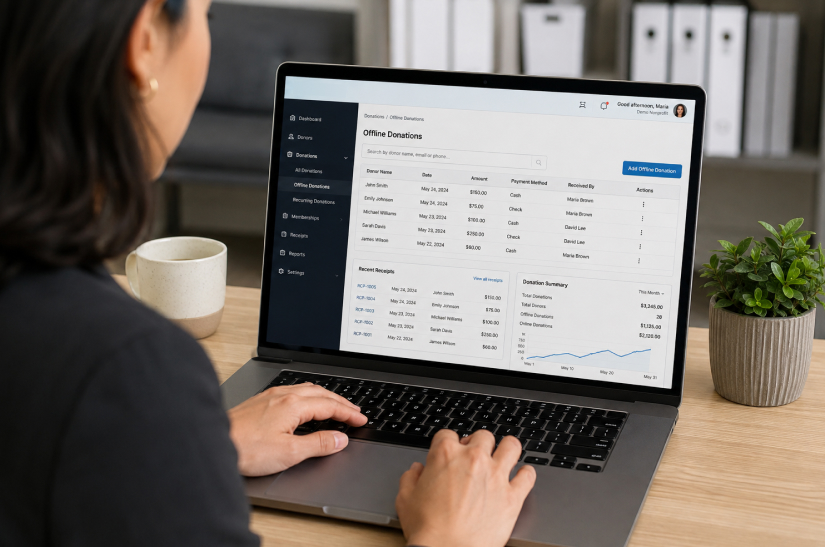
DonorKite is designed specifically for this everyday operational work. It helps nonprofits record offline contributions, maintain donor histories, generate donation receipts and send them through email, SMS or WhatsApp from one organized platform.
What Everyday Donation Management Actually Involves
Donation management is sometimes described as though it means entering an amount into a spreadsheet. In practice, one contribution can touch several parts of a nonprofit’s daily operations.
Confirming whether the donor already has a record
Recording the amount, date and payment method
Assigning the contribution to the right campaign, program or fund
Creating and delivering the appropriate donation receipt
Updating the donor’s complete giving history
Making the information available to other authorized team members
Including the contribution in internal reports
Retrieving or correcting the record when a donor asks a question
A process that works for twenty contributions may become unreliable when the organization begins handling hundreds or thousands of records. Everyday donation management therefore depends less on the complexity of an individual task and more on whether the entire workflow remains accurate, accessible and consistent as volume grows.
Where Nonprofit Teams Lose Time During the Day
Most administrative delays do not come from one major failure. They come from small interruptions repeated throughout the week.
Searching for the Correct Donor Record
A staff member receives a check from someone who donated previously. Before recording it, the employee needs to determine whether the donor already exists in the system. In a spreadsheet, the same person may appear under a shortened name, a previous address or a different email address.
Creating another row may seem harmless, but duplicate profiles divide the donor’s history. One record may contain last year’s cash contribution, while another contains the new check. Reports can then overstate the number of donors and staff may communicate with a returning supporter as though the person is new.
Donor database software helps nonprofits keep donor profiles and contribution histories together so staff can work from a more dependable record.
Recording Cash, Checks and Bank Transfers Consistently
Offline donations arrive in different forms. Cash may be received at an event. Checks may arrive by mail. A bank transfer may appear in the organization’s account with limited information. If staff members record each method differently, important details may be missing.
A consistent entry should usually capture the donor, contribution amount, received date, payment method, campaign or fund and an internal reference. Donor management software for nonprofits can provide one repeatable process for these contribution types instead of allowing every employee to create a separate method.
Preparing and Reissuing Donation Receipts
The work does not end after recording the contribution. The nonprofit may need to generate a receipt, apply the appropriate format, send it to the donor and preserve a copy. Later, the donor may request a correction or replacement.
When receipts are created in separate Word files or PDFs, staff may need to search through folders before they can confirm what was issued. Connecting the receipt with the contribution record makes this work much faster. For a deeper look at receipt workflows, see DonorKite’s guide to donation receipt software.
Answering Basic Questions About Donor History
Nonprofit staff regularly need answers to simple questions:
When did this donor last contribute?
How much has the donor given this year?
Which programs has the donor supported?
Was the previous receipt delivered?
Is this person a first-time or returning donor?
These questions should not require searching several spreadsheets. Donor tracking software for nonprofits makes the contribution timeline easier to review and helps staff respond with information based on the donor’s complete history.
How Donor Software for Nonprofits Simplifies the Daily Workflow
The value of software becomes clearer when it is connected to the tasks staff actually perform. The following workflow shows how a centralized system can simplify routine donation administration.
1. Keep One Organized Record for Each Donor
A centralized donor profile gives staff one place to review contact details, contribution history and related receipt information. This reduces the need to recreate donor information for every transaction and makes duplicate records easier to identify.
Reliable donor data also supports more informed communication. Staff can recognize whether someone is new, returning or consistently supporting a particular program. Learn more about maintaining reliable records in DonorKite’s guide to donor data management.
2. Record Every Offline Contribution the Same Way
A structured donation entry process helps staff capture the same essential information for cash, check and bank transfer contributions. Instead of deciding which spreadsheet columns to use, the employee follows a consistent workflow.
Consistency matters because reporting, receipt generation and donor history all depend on the quality of the original record. Missing dates, payment methods or campaign details create additional work later.
3. Connect Donations With the Correct Campaign or Purpose
Many donors direct their support toward a specific program, appeal, event or general fund. Recording that purpose at the time of entry helps the nonprofit understand where support is coming from and prevents staff from reconstructing allocations later.
This also gives teams a clearer view of which campaigns are active, which donors supported them and how contributions are distributed across organizational priorities.
4. Generate Receipts From Recorded Information
Manual receipt preparation often requires staff to copy the donor name, amount and date from one file into another. Every copy-and-paste step creates another opportunity for an error.
A structured system can generate a receipt from the donor and donation information already recorded. Staff still need to review the details and ensure the receipt meets applicable requirements, but they do not have to rebuild the document from the beginning each time.
5. Deliver Receipts Through Convenient Channels
Different donors prefer different communication channels. Email works well for formal documents and attachments. SMS can provide a quick receipt notification. WhatsApp may be convenient for supporters who regularly use messaging.
Centralized delivery helps staff avoid switching between multiple tools and makes it easier to understand whether a receipt was sent. DonorKite supports receipt delivery through email, SMS and WhatsApp.
6. Give Authorized Staff Access to the Same Information
Donation administration is rarely handled by one person forever. A development employee may record the gift, an administrator may issue the receipt and a manager may review the report. Shared spreadsheets can create version conflicts and unclear responsibilities.
With donation management software for nonprofits, authorized users can work from the same underlying records. This improves continuity when responsibilities change and reduces dependence on files stored on one employee’s computer.
7. Produce Reports Without Rebuilding the Data
Leadership may need donation totals, campaign activity, donor counts or contribution histories. If every report requires staff to combine several files manually, reporting becomes slow and difficult to verify.
Organized records provide a stronger foundation for regular reporting. The system does not make strategic decisions for the organization, but it gives staff more reliable information for planning, reconciliation and internal review.
A Practical Example: One Donation From Start to Finish
Consider a nonprofit that receives a $500 check from an existing donor for a community education program.
1. Staff search for the donor and open the existing profile.
2. The $500 check is recorded with the received date, payment method and education-program designation.
3. The contribution is added to the donor’s giving history.
4. A donation receipt is generated using the recorded information.
5. The receipt is reviewed and sent through the appropriate channel.
6. The receipt remains connected with the contribution record.
7. The donation is included in campaign and period-based reports.
8. If the donor requests another copy later, staff can retrieve the previous receipt without searching unrelated folders.
No single step is complicated. The benefit of donor software for nonprofits is that it connects all of them. Staff do not need separate systems for the donor profile, donation log, receipt file and contribution report.
Everyday Problems That Centralized Donor Software Can Reduce
Everyday problem | Operational effect |
Duplicate donor profiles | Contributions are divided across several records, making history and reporting unreliable. |
Missing contribution details | Staff must investigate dates, payment methods or campaign assignments later. |
Receipts stored separately | Older receipts are difficult to locate, correct or reissue. |
Different staff processes | Employees record similar donations in inconsistent ways. |
Manual report consolidation | Teams spend time combining spreadsheets before every review. |
Limited donor context | Staff cannot quickly identify new, returning or inactive donors. |
Dependence on one employee | Critical files and knowledge remain with one person instead of the organization. |
Software does not guarantee perfect data. Staff still need clear procedures, accurate entry and appropriate review. However, a centralized platform provides a stronger structure than disconnected files and makes everyday errors easier to identify and correct.
How Donor Software Supports Better Donor Service
Donation management is an administrative process, but donors experience the results. A missing donation, incorrect name or delayed receipt can make a supporter question whether the organization is managing contributions carefully.
Accurate histories allow staff to acknowledge donors with better context. A returning supporter should not receive communication that treats the person as a first-time donor. Someone who consistently supports one program may appreciate updates related to that work.
Software cannot create sincere appreciation or meaningful relationships by itself. It can, however, help staff avoid administrative mistakes that weaken those relationships. DonorKite’s article on nonprofit donor retention strategies explains how reliable records and timely acknowledgments support a more dependable donor experience.
When Does a Nonprofit Need Dedicated Donor Software?
There is no universal donor count at which every organization must stop using spreadsheets. The right time depends on how much administrative complexity the current process creates.
A nonprofit should consider dedicated software when:
Donor records are spread across several spreadsheets or inboxes.
Duplicate profiles are becoming common.
Staff spend too much time searching for donation history.
Receipt creation and reissue requests consume significant time.
Multiple team members need access to contribution records.
Cash, checks and bank transfers are recorded inconsistently.
Leadership reports require repeated manual consolidation.
The organization cannot easily determine who is new, returning or inactive.
The current process depends heavily on one employee.
Donation volume is increasing faster than the administrative process can support.
For smaller organizations, the decision should not be based only on size. Donor software for small nonprofits can be valuable when a limited team needs to reduce repetitive work and maintain dependable records without adopting an unnecessarily complex system.
How DonorKite Simplifies Everyday Donation Management
DonorKite is donor software for nonprofits that need a simpler way to manage offline contributions, donor records and donation receipts. It does not collect or process online donations. Its focus is the administrative work that begins when an organization receives cash, a check or a bank transfer.
With DonorKite, nonprofits can:
Maintain centralized donor profiles
Record cash, check and bank transfer donations
Review complete donor contribution histories
Assign donations to campaigns and activities
Generate donation receipts from recorded information
Send receipts through email, SMS and WhatsApp
Keep receipt information connected with donation records
Find previous donations and receipts more quickly
Create donation and donor reports
Reduce dependence on disconnected spreadsheets and folders
The goal is not to add another complicated system to the nonprofit’s workload. It is to give staff one organized place for the everyday tasks they already perform.
Explore DonorKite to see how centralized donor records, offline donation tracking and receipt management can support your organization.
Everyday Donation Management Checklist
Use this checklist to assess whether the organization’s current process is dependable:
Each donor has one accurate profile.
Cash, checks and bank transfers follow the same recording process.
Every donation includes an amount, date, payment method and purpose.
Donations are connected with the correct donor.
Receipts are generated from verified contribution details.
Receipt delivery and previous copies can be reviewed.
Authorized staff can access the information they need.
Duplicate records can be identified and corrected.
Reports can be produced without rebuilding data manually.
Donor history remains available when staff responsibilities change.
If several of these points are difficult to confirm, the organization may have outgrown a spreadsheet-based process.
Conclusion
Everyday donation management is made up of small tasks that must be completed accurately and repeatedly. A nonprofit needs to identify donors, record offline contributions, generate receipts, preserve histories, coordinate staff and prepare reports. When each task takes place in a separate file, routine administration becomes slower and more error-prone.
Donor software for nonprofits simplifies this work by connecting donor information, donation records, receipt management and reporting within one structured workflow. It does not replace the human work of thanking donors or building relationships. It gives nonprofit teams more reliable information and reduces the administrative effort required to manage each contribution.
For organizations receiving cash, checks and bank transfers, DonorKite provides a focused way to keep donor records, offline donations and receipts organized as everyday activity grows.